
From Mexico — I hand coding agents longer jobs every month: a dependency bump across a monorepo, a refactor that touches forty files, a test suite that takes an hour. The model can hold the task now. The weak link is where it runs. My laptop sleeps when I close the lid, and I’m not leaving it open all night so an agent can finish. On Sep 24, Docker shipped its answer: Cloud Sandboxes, the same microVM sandbox you can run locally, now on Docker-managed compute, with one command to move between the two.
What Docker actually shipped
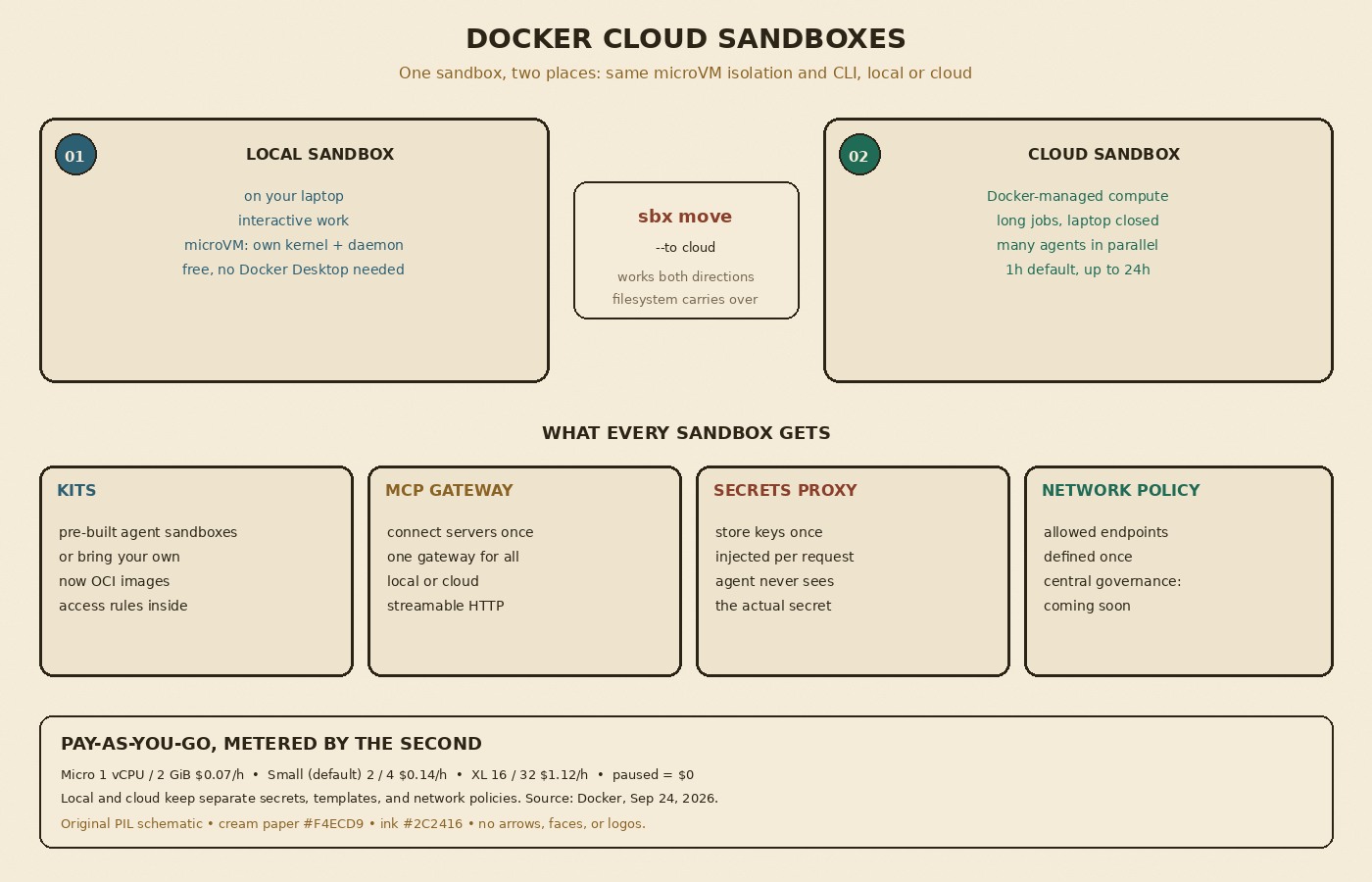
Earlier this year Docker launched Docker Sandboxes: microVMs with their own kernel and Docker daemon, isolated from your machine, so an agent can work on its own without reaching your files, network, or secrets. Per the launch post, Cloud Sandboxes are that same microVM running in Docker’s cloud. In Docker’s words: “The isolation model is identical. The CLI is identical.” The press release says it launched at WeAreDevelopers North America and is available now.
The part I like most is the handoff. You start with an agent locally, and when the job outgrows your laptop you run sbx move my-project --to cloud. The move captures the sandbox’s filesystem and recreates it on the other side, and it works in both directions. You can also start straight in the cloud, for example sbx --cloud run codex, and run many tasks in parallel, each in its own microVM with its own secrets and network policy.
The guardrails that come with it
Docker frames an unattended agent as needing three things: nothing to install, tools to do the job, and limits on what it can reach. What ships:
- Kits. Pre-built sandboxes for popular coding agents (Claude Code, Codex, Copilot, and others), or your own. The press release says next-generation Kits are now standard OCI images with the access rules packaged inside, and that Docker has committed to submitting the Kits spec to the CNCF.
- MCP gateway. Connect MCP servers once (Jira, Linear, Grafana, incident.io, or any streamable HTTP endpoint), and every agent reaches them through a single gateway, in the cloud or locally.
- Secrets proxy. You store keys once, and a proxy injects them per request, so the agent never sees the actual secret. Docker’s point: a prompt injection can’t leak a secret the agent never had.
- Network policies. Define once which endpoints agents can reach. Centralized governance for enterprises is listed as coming soon through Docker AI Governance, so it’s not part of this release.
Pricing and limits
Cloud Sandboxes are pay-as-you-go, with compute metered by the second. A paused sandbox costs nothing, and volumes and egress are free. You bring your own model key, so inference stays with your current provider. The posted sizes go from Micro (1 vCPU, 2 GiB) at $0.07 an hour, through the default Small (2 vCPU, 4 GiB) at $0.14, up to XL (16 vCPU, 32 GiB) at $1.12 an hour. Sessions run for one hour by default and up to 24 hours. You need sbx 0.45.1 or later and the pay-as-you-go plan, which Docker says is available on Personal and Pro accounts. Local sandboxes stay free and don’t require Docker Desktop. Docker also claims cloud sandboxes boot in the low hundreds of milliseconds. I haven’t measured that myself.
What I’d check before moving a workflow
One detail is easy to miss: Docker says local and cloud sandboxes keep separate secrets, templates, and network policies. So “same isolation” doesn’t mean your local config follows you automatically, and I’d read the sandbox docs before the first sbx move. I’d also start with the default size and a paused-when-idle habit before scaling to dozens of parallel agents, since per-second billing adds up differently when nobody’s watching.
My takeaway
Once agents run for hours instead of minutes, the question isn’t only whether it’s safe to leave one alone. It’s also where it runs while you’re asleep. Docker’s bet is one isolation model in two places, with an easy way to move between them, rather than a separate cloud product with different rules. That matches how I actually work: interactive stuff on my machine, long grinds somewhere that doesn’t sleep. If you already use Docker Sandboxes locally, the Sep 24 post is the map for trying the cloud side.