
From Mexico — most teams I know have a folder of “small tools” nobody owns: a spreadsheet macro that became a dashboard, a script someone wrote on a Friday, an internal form running on a personal account. AI coding tools are about to multiply that folder, because now anyone can describe an app and get one. So the question I care about isn’t whether non-developers can build apps. It’s where those apps run, and who has to maintain them afterward. On Sep 25, Microsoft gave its answer: Copilot Managed Runtime, now in public preview.
What Microsoft announced
The runtime came alongside a redesigned Copilot app. In the main announcement, Microsoft introduced Home, Code, and Autopilot. For software people, Code is the interesting one: you describe an app, tracker, dashboard, automation, or workflow in plain language, and Copilot picks an approach and builds it, from desktop widgets to cloud-hosted internal apps you can share with your team. Microsoft says Code is “powered by the same underlying technology as GitHub Copilot,” runs in a sandboxed environment, and can be hosted inside your tenant. It also says your developers keep using GitHub Copilot day to day, with more connectivity into the Copilot platform.
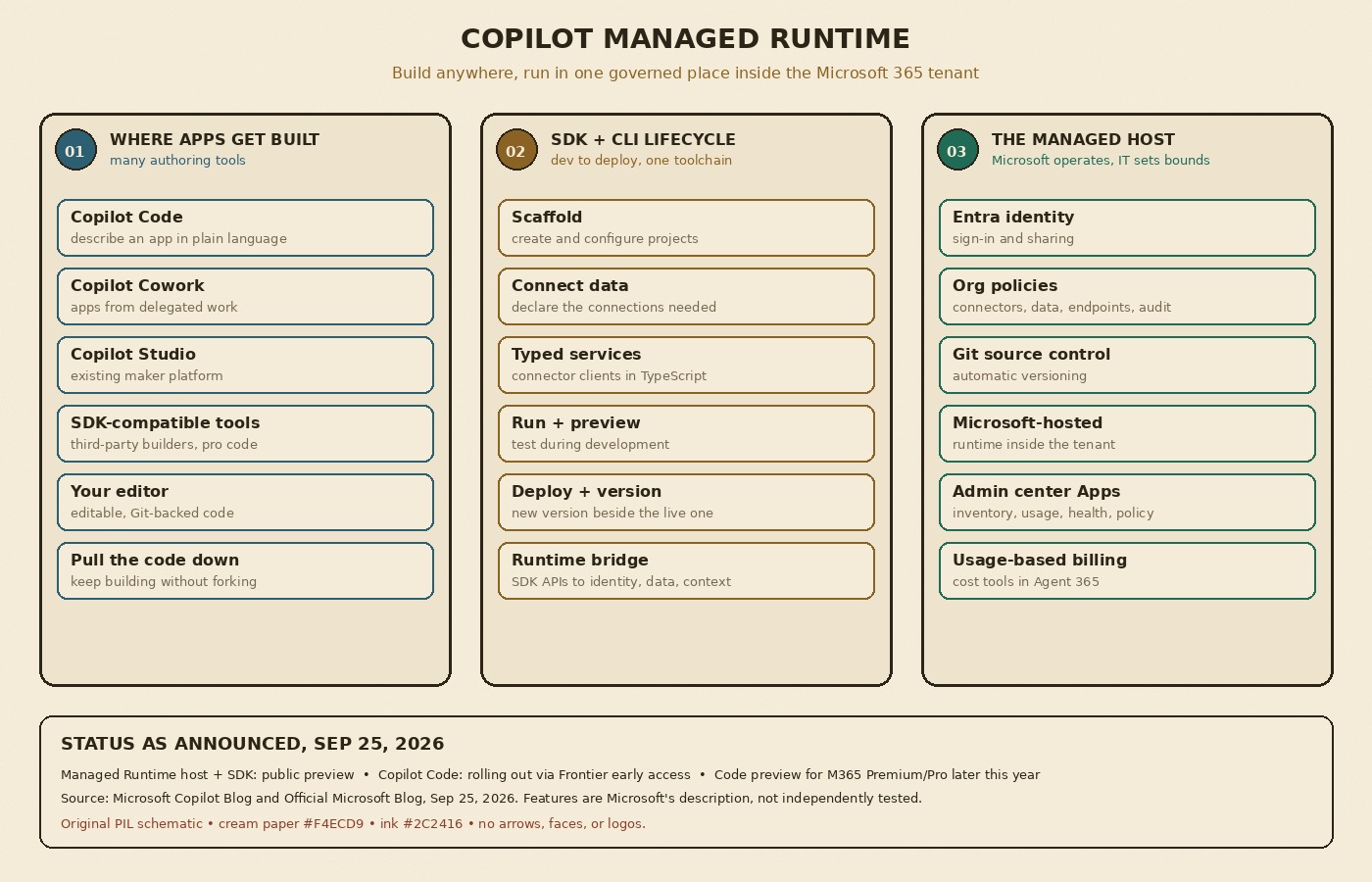
Code is rolling out through Microsoft’s Frontier early-access program, with broad availability in the coming weeks, and a preview for Microsoft 365 Premium and Pro subscribers later this year. Copilot Managed Runtime is the hosting layer underneath: per the Copilot blog post, it runs code inside the Microsoft 365 tenant boundary, governed by IT, and it already powers apps built in Copilot Cowork, Copilot Code, and Copilot Studio. Microsoft is also opening it to third-party tools and professional developers.
The part developers will actually touch
This isn’t only a no-code story. Microsoft describes a Copilot Managed Runtime SDK and CLI that cover the whole lifecycle, not just packaging a finished app:
- Scaffold and configure projects, and declare the data connections the app needs.
- Generate typed services for working with connectors from TypeScript.
- Run and preview during development, then deploy and version through the same toolchain. Microsoft says a team can preview a new version while the current one stays available to users.
- Call host services at runtime through SDK APIs, including governed access to enterprise data, identity, and Copilot work context.
The detail I like most is Git. Microsoft says the host does automatic version and source control via Git, and that developers keep working with editable, Git-backed code in the tools they already use. One of its example scenarios is exactly the handoff I worry about: a team builds an app in Cowork, and a developer pulls the code down to keep building on it without forking it or standing up a separate runtime and governance stack. Microsoft also quotes Lovable saying an app made there can now run inside a Microsoft tenant with the same sign-in, policies, and app inventory as everything else.
Governance, identity, and cost
On the ops side, apps on the host use Microsoft Entra identity for access and sharing, and organizational policies decide which connectors, data, and endpoints an app can use, with auditing. Hosted apps show up in a new Apps experience in the Microsoft 365 admin center, where admins can review access, usage, health, and policy in one inventory, whichever tool the app was built in. Microsoft’s framing: “Microsoft operates the platform; your organization sets the boundaries; you remain in control.” On spend, the main post says Code runs on usage-based billing, and that cost management in Agent 365 is expanding to include Code and Copilot Managed Runtime.
What I’d check before betting on it
First, it’s a public preview, and Code itself is still rolling out through early access, so I’d treat this as something to pilot, not a platform to move production tools onto next week. Second, neither post gives pricing specific to the runtime, so I’d want real numbers before an entire department starts shipping apps on usage-based billing. Third, the only language the posts name for the typed connector services is TypeScript. If your internal tools live in Python or .NET, check the docs before assuming that path fits. And the obvious trade-off: the governance is great precisely because everything lives inside Microsoft 365. If your stack isn’t already there, that’s a bigger decision than picking a coding tool.
My takeaway
AI keeps making code cheaper to write, and the cost moves to everything after: hosting, identity, permissions, versioning, and knowing what’s even running. What I find interesting here isn’t the “anyone can build an app” pitch. It’s that Microsoft is treating the run side as the product, with Git and a CLI so a developer can pick up an AI-built app instead of rewriting it from scratch. Whether that holds up depends on how the preview behaves in real tenants, and I haven’t tried it myself yet. If you’re the person who usually inherits the “small tools” folder, the Managed Runtime post is worth ten minutes this weekend.
Featured image: “Greenhouses in qom 04” by Mostafa Meraji (Mostafameraji), Wikimedia Commons, CC BY-SA 4.0, cropped and color-graded.